
I. Three Prerequisites for Enabling HTTP/3
To successfully enable the HTTP/3 protocol on your website, you must complete the following three configuration steps in advance. All three are essential; please check them one by one in the order listed.
1. Nginx version ≥ 1.25.5
Native support for HTTP/3 has been officially stable since Nginx version 1.25.5; versions prior to this cannot natively compile and enable QUIC. Baota users can check their current Nginx version in the website settings.
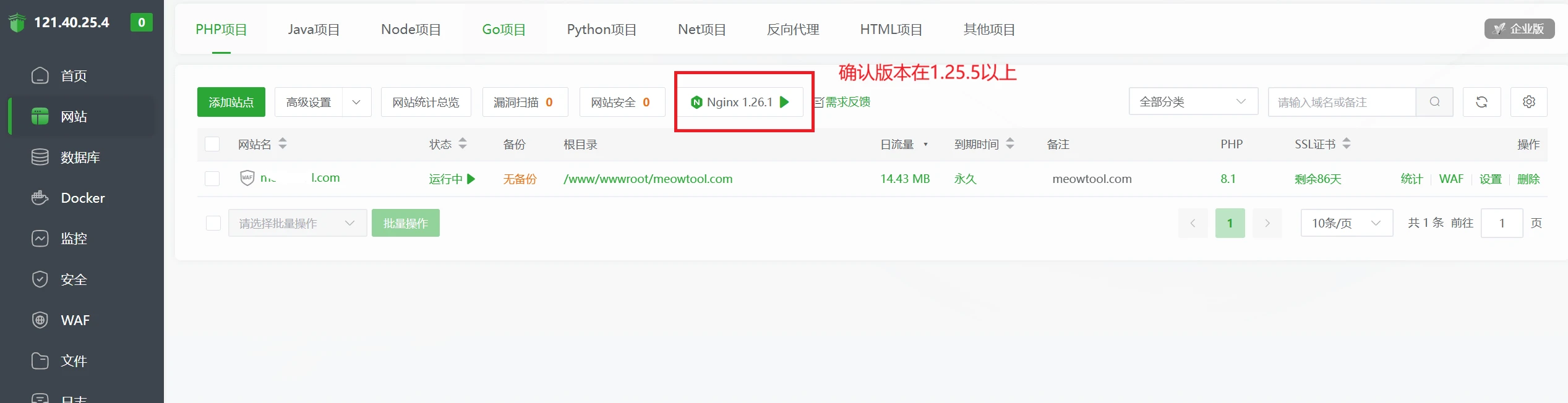
If your version number is lower than this, go to the Baota Panel → Software Store → find Nginx → click "Compile and Install," select a stable version of 1.25.5 or higher, and ensure the QUIC-related components are checked by default in the compilation options. We do not recommend using the system repository for one-click upgrades, as this can easily result in missing HTTP/3 dependencies, preventing QUIC from being enabled.
2. An SSL certificate has been deployed on the site (HTTPS)
The HTTP/3 protocol requires an HTTPS-encrypted environment; websites using plain HTTP cannot enable HTTP/3. If you do not have a certificate, you can apply for a free Let's Encrypt wildcard or single-domain certificate through the BaoTower SSL module.

3. Baota Firewall + Cloud Server Security Group: Allow UDP Port 443
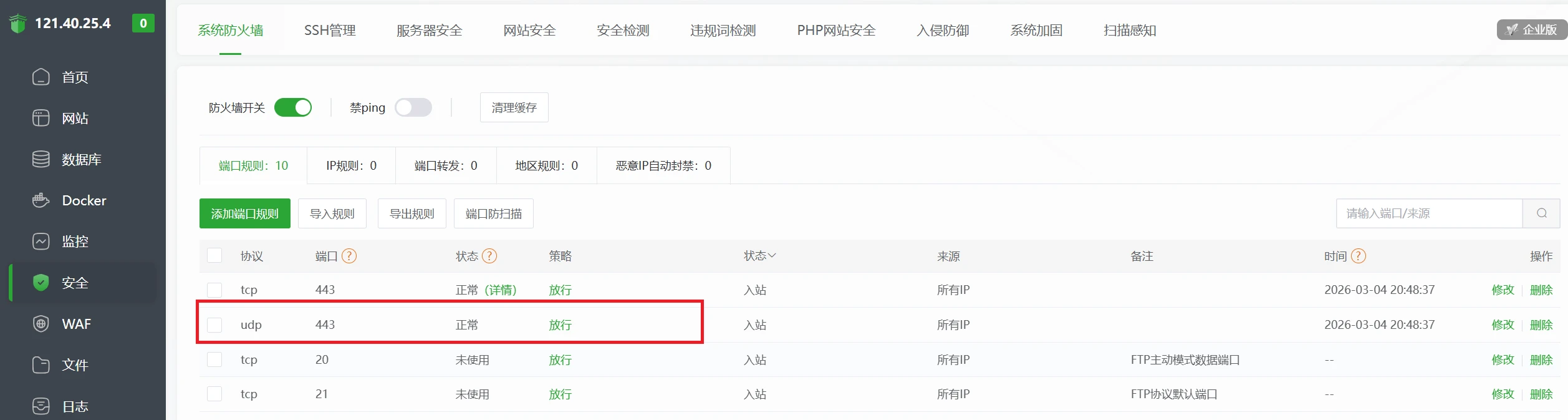
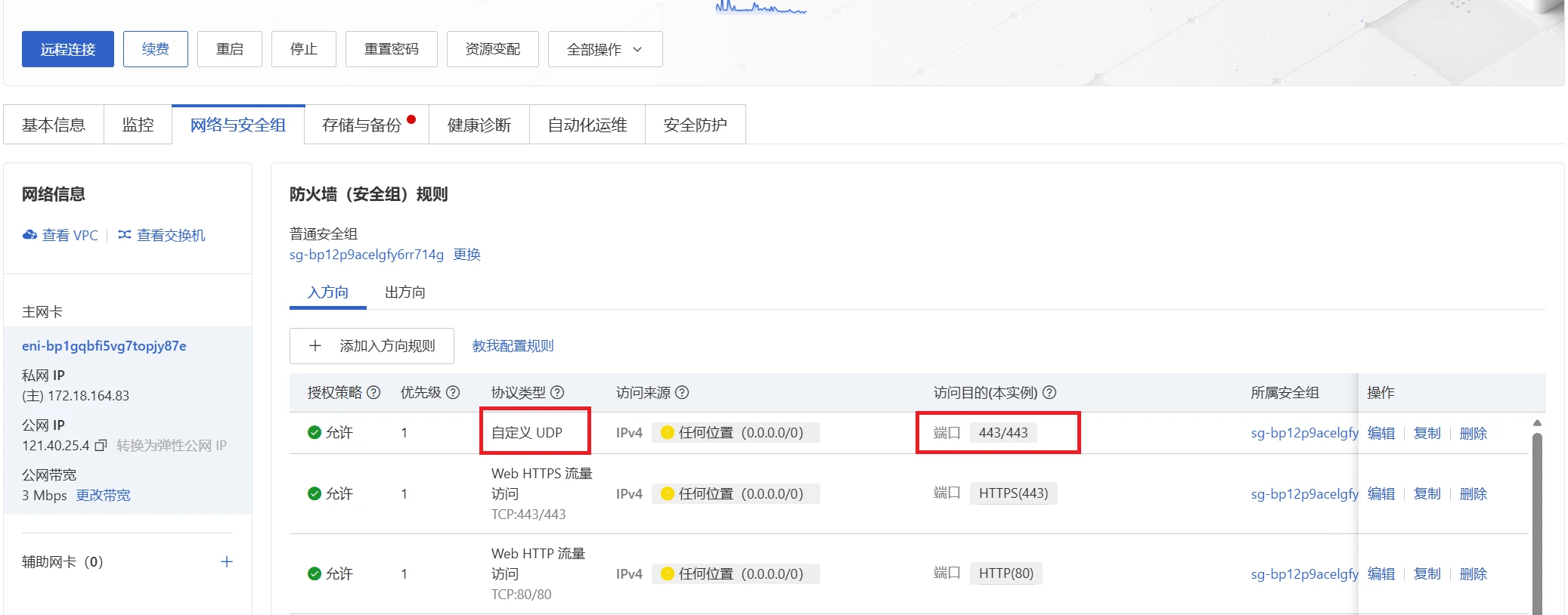
HTTP/3 is transmitted using the UDP protocol at the lower layer; TCP port 443 does not work. You need to enable inbound UDP port 443 rules in two places simultaneously.
① Baota Panel → Security → Port Rules, add a rule to allow UDP port 443:
② In the security group settings of service providers such as Alibaba Cloud and Tencent Cloud, add an inbound rule to allow all IP addresses on UDP port 443:
II. Modifying the Site’s Nginx Configuration (Complete Configuration for IPv4 Only)
Path: Baota Panel → Websites → Relevant Domain → Settings → Configuration File
Important Reminder: Before pasting the configuration, select all of the existing configuration and copy it to create a backup. This will allow you to quickly roll back and restore the configuration in case of an error.
Below is the HTTP/3 Nginx configuration code that has been tested and confirmed to work. Simply select all of it and replace your existing server configuration:
server {
    # ---------- Basic Listening ----------
    listen 80;
    listen 443 ssl; # IPv4 HTTPS + HTTP/2
    http2 on;
    listen 443 quic reuseport; # IPv4 QUIC (HTTP/3) - reuseport enabled only for the first site

    # ---------- Site Information ----------
    server_name meowtool.com www.meowtool.com;
    root /www/wwwroot/meowtool.com;
    index index.php index.html index.htm default.php default.htm default.html;

 # ---------- SSL Certificates ----------
    ssl_certificate    /www/server/panel/vhost/cert/meowtool.com/fullchain.pem;
    ssl_certificate_key /www/server/panel/vhost/cert/meowtool.com/privkey.pem;

    # ---------- SSL Protocols and Optimization ----------
    ssl_protocols TLSv1.2 TLSv1.3; # Change to support both TLSv1.2
    ssl_ciphers 'ECDHE-ECDSA-CHACHA20-POLY1305:ECDHE-RSA-CHACHA20-POLY1305:ECDHE-ECDSA-AES128-GCM-SHA256: ECDHE-RSA-AES128-GCM-SHA256:ECDHE-ECDSA-AES256-GCM-SHA384:ECDHE-RSA-AES256-GCM-SHA384';
    ssl_prefer_server_ciphers on;
    ssl_session_cache shared:SSL:10m;
    ssl_session_timeout 10m;
    ssl_session_tickets on;
    ssl_early_data on; # 0-RTT (HTTP/3 optimization)

 # ---------- Key HTTP/3 Configuration ----------
    http3 on; # Enable HTTP/3
    add_header Alt-Svc 'h3=":443"; ma=86400; persist=1';  # Notify browsers of HTTP/3 support

    # ---------- Force HTTPS Redirect (Automatically generated by BaoTower; do not modify)----------
    set $isRedcert 1;
    if ($server_port != 443) {
 set $isRedcert 2;
    }
    if ( $uri ~ /\.well-known/ ) {
        set $isRedcert 1;
    }
    if ($isRedcert != 1) {
 rewrite ^(/.*)$ https://$host$1 permanent;
    }

    # ---------- Security Enhancements ----------
    add_header Strict-Transport-Security "max-age=315360000" always;  # HSTS enabled (Optional)
    error_page 497  https://$host$request_uri; # Redirect HTTP requests to the HTTPS port

    # ---------- Static File Caching ----------
    location ~ .*\.(gif|jpg|jpeg|png|bmp|swf)$ {
 expires 30d;
        access_log off;
    }
    location ~ .*\.(js|css)?$ {
 expires 12h;
 access_log off;
    }

 # --------- - Protection for Sensitive Files and Directories (to Prevent Leaks)----------
    location ~* /(\.git|\.svn|\.bzr|\.vscode|\.claude|\.idea|\.ssh|\.github|\.npm|\.yarn|\. pnpm|\.cache|\.husky|\.turbo|\.next|\.nuxt|node_modules|runtime)/ {
 return 404;
    }
    location ~* (\.user.ini|\.htaccess|\.htpasswd|\.env.* |\.project|\.bashrc|\.bash_profile|\.bash_logout|\.DS_Store|\.gitignore|\.gitattributes|LICENSE|README\.md|CLAUDE\.md|CHANGELOG\.md|CHANGELOG|CONTRIBUTING\. md|TODO\.md|FAQ\.md|composer\.json|composer\.lock|package(-lock)?\.json|yarn\.lock|pnpm-lock\.yaml|\.\w+~|\.swp|\.swo|\.bak(up)? |\.old|\.tmp|\.temp|\.log|\.sql(\.gz)?|docker-compose\.yml|docker\.env|Dockerfile|\.csproj|\.sln|Cargo\.toml|Cargo\. lock|go\.mod|go\.sum|phpunit\.xml|phpunit\.xml|pom\.xml|build\.gradl|pyproject\.toml|requirements\.txt|application(-\w+)?\.(ya?ml|properties))$
    {
 return 404;
    }

 # ---------- Allow access to the Let's Encrypt validation directory ----------
    location ~ \.well-known {
 allow all;
    }
    # Prevent dangerous scripts from being placed in the validation directory
    if ( $uri ~ "^/\.well-known/.*\.(php|jsp|py|js|css|lua|ts|go|zip|tar\.gz|rar|7z|sql|bak)$" ) {
        return 403;
    }

 # ---------- PHP Parsing----------
    include enable-php-81.conf;   # Modify according to your PHP version (e.g., enable-php-74.conf)

 # ---------- Other Included Files----------
    include /www/server/panel/vhost/nginx/well-known/meowtool.com.conf;
    include /www/server/panel/vhost/nginx/extension/meowtool.com/*.conf;
    include /www/server/panel/vhost/rewrite/meowtool.com.conf;

 # ---------- Logs ----------
    access_log  /www/wwwlogs/meowtool.com.log;
    error_log   /www/wwwlogs/meowtool.com.error.log;
}
Configure the following two required changes:
- Change Domain Name: Bulk Replace Throughout the Text
meowtool.comUpdate the domain name, certificate path, and log path for your website accordingly. - Change the PHP version:
include enable-php-81.conf;, Replace 81 with the site's actual PHP version (74, 80, 82, etc.).
Once you've finished making changes, save the configuration and restart the Nginx service for the changes to take effect.
III. Methods for Online Validation of HTTP/3
Open a third-party authoritative testing site, enter the domain name, and click to verify whether QUIC and H3 have been successfully enabled:
Testing location:https://http3check.net/
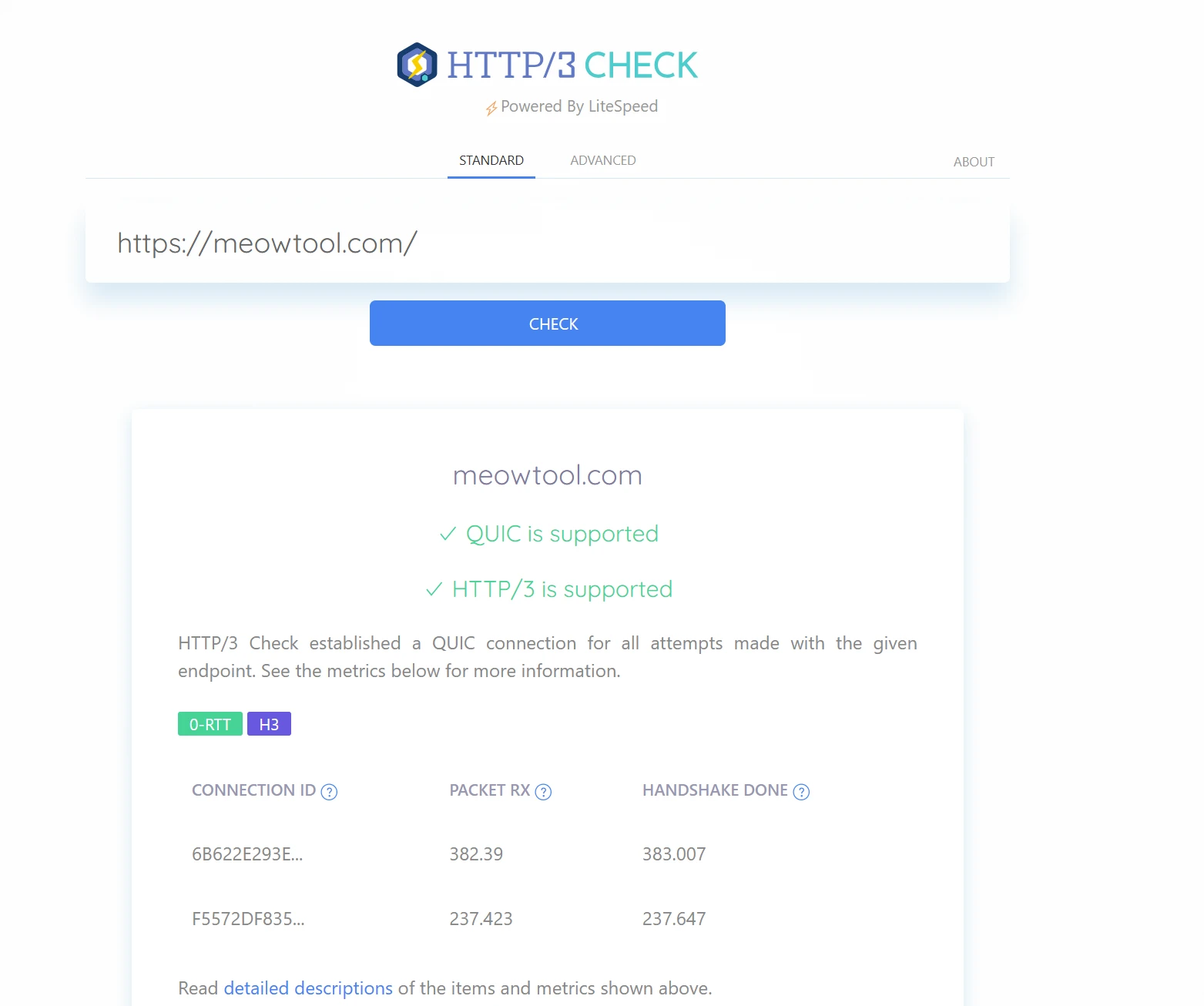
Page Prompt QUIC is supported; HTTP/3 is supported This indicates that the configuration was successful.
IV. Fix for the "Undefined array key "HTTP_HOST'" Error When Enabling H3 in WordPress
Explanation of Error Causes
After enabling HTTP/3, the protocol uses the `:authority` pseudo-header to pass the domain name and no longer includes the traditional `Host` request header. Nginx’s default FastCGI rules cannot read this parameter, causing the PHP function `$_SERVER['HTTP_HOST']` to return an empty value and trigger a WordPress warning.
- HTTP/1.1 / HTTP/2: Transmitting the domain name via the Host header
- HTTP/3 (QUIC): Relies on the :authority pseudo-header; no native Host header
Specific Troubleshooting Steps
File path:/www/server/nginx/conf/fastcgi.conf, Add a new line of parameters at the end of the file:
fastcgi_param HTTP_HOST $host;
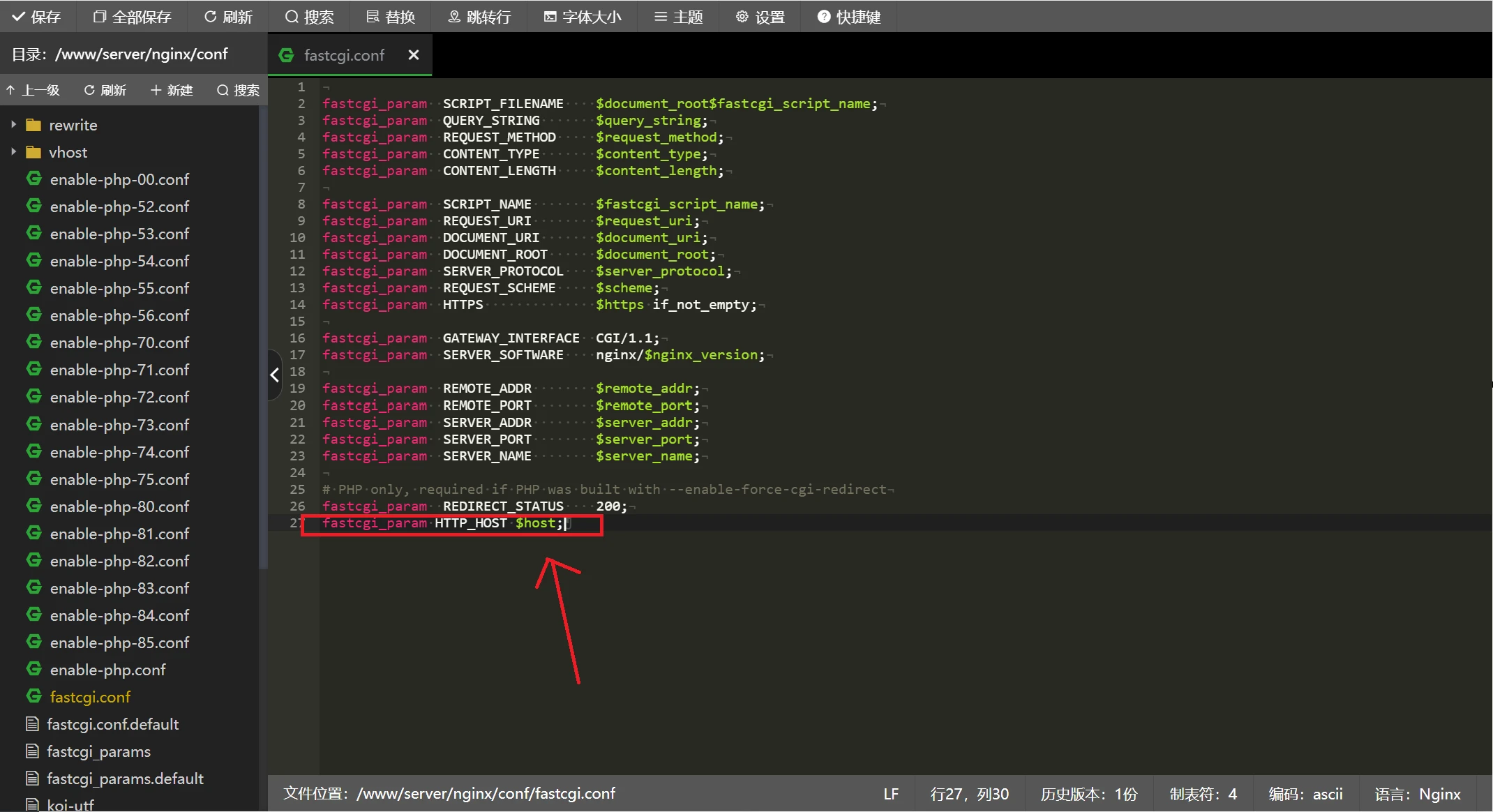
Save the file, reload the Nginx configuration, and the WordPress error will be resolved immediately.
![[WordPress Plugin] TranslatePress Multilingual Sitemap Generator](https://www.meowtool.com/wp-content/uploads/2026/08/20260808185807786088.webp)