
I wrote a small plugin to fix the issue where TranslatePress sites only have a sitemap for the default language.
If you're using TranslatePress When setting up a multilingual WordPress site, you may run into a frustrating problem: even though the site has English, French, and Spanish versions—among others—search engines can only crawl the pages in the default language.
The reason is simple—WordPress generates it natively wp-sitemap.xml The URL links include only the default language; pages in other languages are completely absent from the sitemap. This means search engines have no way of knowing that your website has versions in other languages, so naturally, they won’t index them.
To address this pain point, I developed this WordPress Multilingual Sitemap Generator, designed specifically to address the lack of multilingual sitemaps on TranslatePress sites.
What can this plugin do?
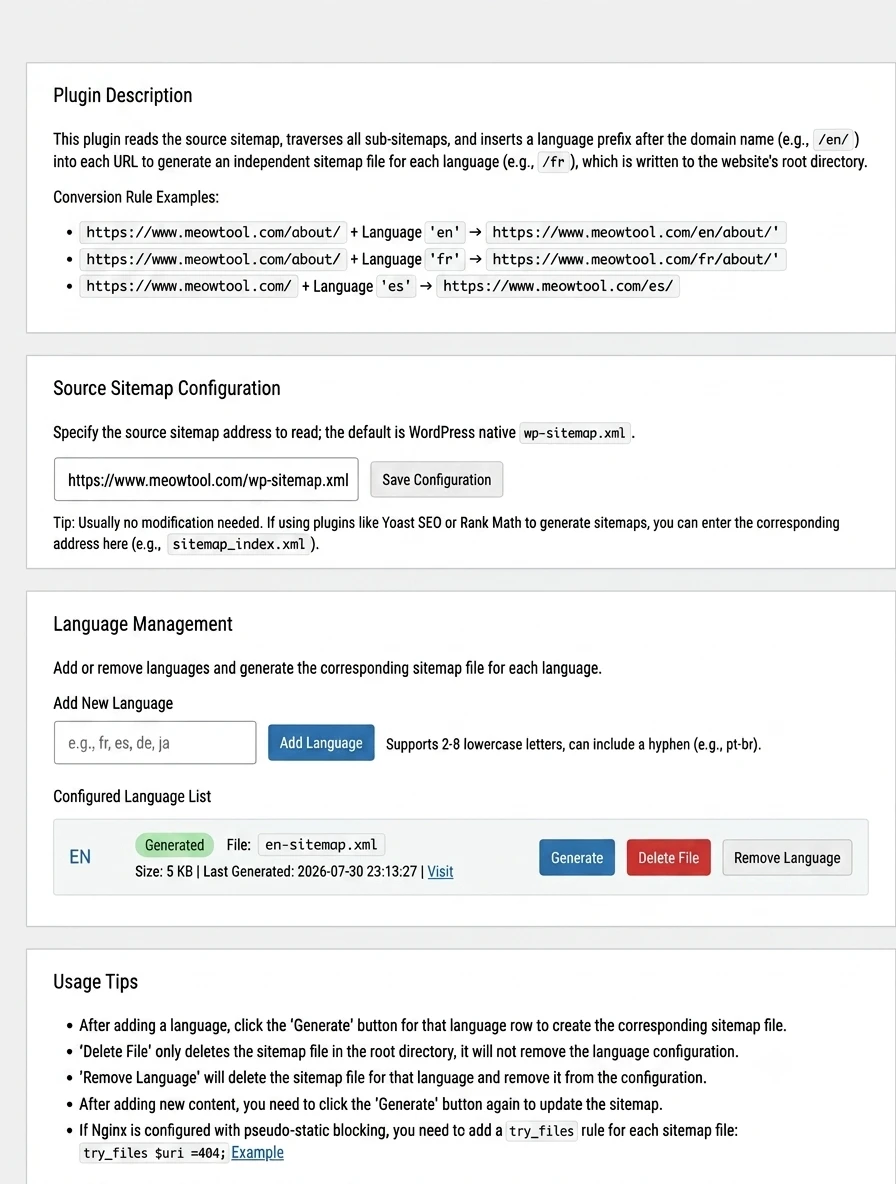
Simply put, the plugin reads WordPress's native wp-sitemap.xml(It is also compatible with sitemaps generated by SEO plugins such as Yoast SEO and Rank Math.) It traverses all sub-sitemaps within them, automatically inserts a language prefix after the domain name for each URL, and then generates a separate sitemap file for each language.
For example, if your website's default language is Chinese:
| Original URL | Language | Generated URL |
|---|---|---|
https://www.example.com/about/ |
en | https://www.example.com/en/about/ |
https://www.example.com/about/ |
fr | https://www.example.com/fr/about/ |
https://www.example.com/ |
es | https://www.example.com/es/ |
Ultimately, the plugin will generate a file similar to the following in your website's root directory: en-sitemap.xml、fr-sitemap.xml、es-sitemap.xml These standalone sitemap files. You can submit these files separately to Google Search Console and Bing Webmaster Tools to clearly inform search engines which language versions of your website are available.
Overview of Core Features
- ✅ Read WordPress natively
wp-sitemap.xml...and is also compatible with sitemaps generated by popular SEO plugins such as Yoast SEO and Rank Math - ✅ Multilingual Management: Freely add or remove languages; supports
en、fr、pt-brLanguage codes (2–8 lowercase letters) - ✅ Generate separately for each language
xx-sitemap.xmlFiles, written directly to the website's root directory - ✅ Supports manual creation and deletion of files, offering flexible operation
- ✅ Offers both Chinese and English versions of the admin interface; choose the one you need
Installation Instructions (Super Easy)
This plugin is a bit unusual—it consists of a single PHP file rather than a traditional folder. There are two ways to install it:
Method 1: Upload via the Backend Compression Feature (Recommended for Beginners)
- Select the PHP file you want to install on your local machine (based on your admin panel language)
Multi-Language Sitemap Generator-zh_CN.php或Multi-Language Sitemap Generator-en.php), compressed directly to zip Format - ⚠️ Note: Please compress this PHP file directly; do not wrap it in an additional folder, otherwise WordPress may not recognize the plugin header.
- Log in to the WordPress admin panel and go to Plugins → Install Plugins → Upload Plugin
- Select the ZIP file you just created, then click Install Now
- Once the installation is complete, click Enable the plugin
⚠️ The two PHP files have exactly the same functionality; the only difference is the language used in the admin interface,Select one of them to install; do not enable both at the same time.。
Method 2: Upload via FTP or the hosting control panel
Use an FTP tool or the hosting provider's built-in file manager to upload the PHP file directly to /wp-content/plugins/ Go to the "Plugins" section, then enable it from the list of plugins in the WordPress dashboard.
Why Does Your Multilingual Website Need This Plugin?
1. Ensure that search engines fully index all language versions
Without a separate multilingual sitemap, search engines can only discover pages in the default language. With this plugin, pages in every language version can be discovered and indexed by search engines.
2. Improve the SEO performance of multilingual pages
Submit the sitemaps for each language version to Google Search Console separately. This allows search engines to better understand your website’s language structure, which helps improve your rankings in search results for the corresponding languages.
3. Works perfectly with TranslatePress
This plugin is specifically designed for TranslatePress's URL prefix structure (such as /en/、/fr/), and the generated files integrate seamlessly with TranslatePress's multilingual system.
4. Lightweight, so it doesn't slow down the website
The plugin runs only when you need to generate or delete a sitemap; it has no impact on the front-end performance of your website.
Conclusion
If you're using TranslatePress to build a multilingual WordPress site, this plugin is practically a must-have. It addresses the most fundamental—and most easily overlooked—issue in multilingual website SEO: ensuring search engines can discover all your language versions.
Installation takes just two minutes, and generating a sitemap is as simple as clicking a button, but the SEO benefits are long-lasting.
The project is completely open source. Feel free to use it, provide feedback, or contribute code. Here is the GitHub link:
→ https://github.com/cheng01315/wordpress-multi-language-sitemap-generator
If you find this useful, please feel free to give it a star to show your support. Thanks!
![[WordPress Plugin] TranslatePress Multilingual Sitemap Generator](https://www.meowtool.com/wp-content/uploads/2026/08/20260808185807786088.webp)