
As a WordPress site administrator or SEO professional, have you ever been frustrated by the proliferation of duplicate content on your site? Due to pagination, tags, tracking parameters, and other factors, the same piece of content is often accessible via multiple different URLs. This not only dilutes page authority but also makes it difficult for search engines to determine which version is the “authoritative” one. Today, we’d like to recommend a new tool—WP Canonical Manager...It can help you completely resolve the challenges of managing canonical URLs.
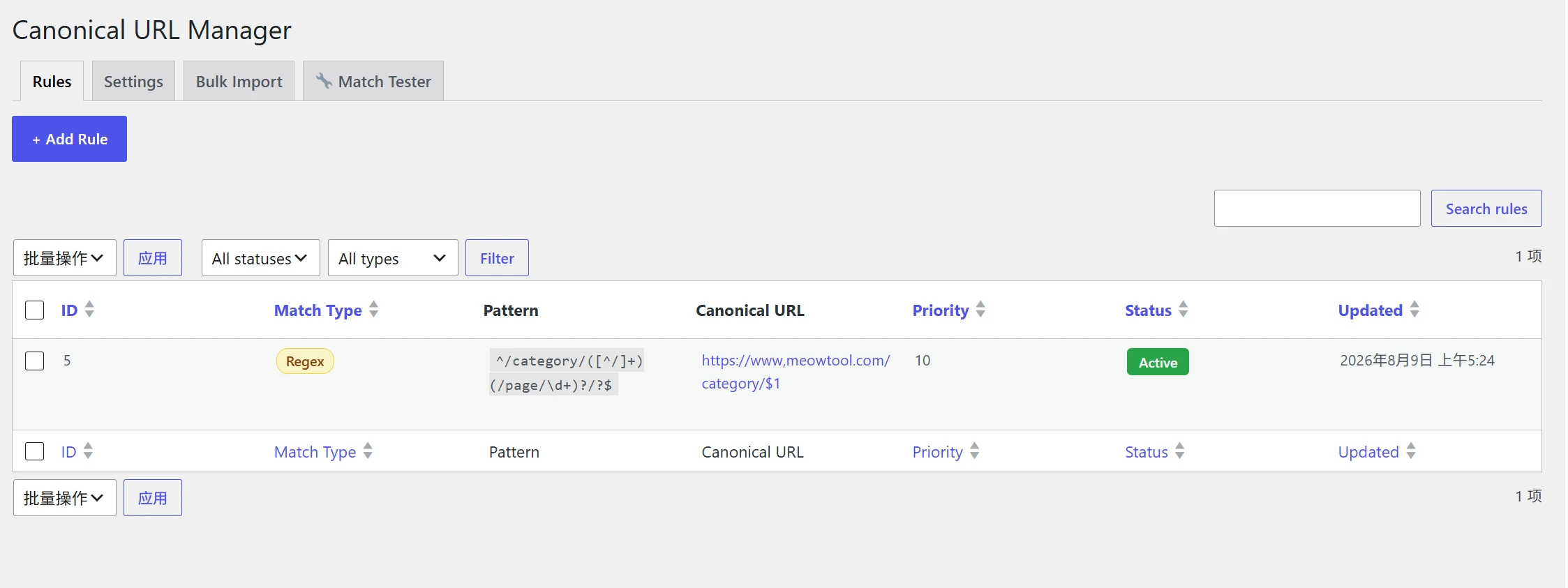
Quark Cloud Storage Download Link:https://pan.quark.cn/s/90ba87d211ed
GitHub Project URL:https://github.com/cheng01315/WP-Canonical-Manager
Key Features: Accurate, Flexible, and Powerful
WP Canonical Manager It provides an enterprise-level solution. Its core features include:
Two matching modes to handle complex scenarios
- Exact Match: Suitable for simple scenarios where you want to redirect specific old URLs to new ones.
- Regular Expression Matching: This is its most powerful feature. Using regular expressions, you can match a specific type of URL pattern in bulk (such as all author pagination pages
/author/name/page/2/), and use capture groups (such as$1) Dynamically generate standardized links.A single rule can solve the pagination issue for the entire site。
Wide Compatibility and Coverage
It can be used with Yoast SEO, Rank Math, AIOSEO, SEOPress It works seamlessly with mainstream SEO plugins. Through a dual safeguard of “output buffer cleaning” and dedicated hooks, this plugin ensures that the standardized links it generates take precedence. The output <link rel="canonical"> The label will be attached Notes to help you quickly identify items.
Built-in utilities make operations and maintenance easier
- Batch Operations: Supports batch enabling, disabling, and deleting rules using checkboxes, and provides CSV Bulk Import Features.
- Built-in Debugging Tools: The “Match Test” tab in the backend simulates URLs and displays the matching process. Add front-end URLs
?wcm_debug=1(Visible to administrators only), and you'll see the full log at the bottom of the source code.This makes troubleshooting easier than ever before.。
Installation Instructions (Super Easy)
This plugin is a A Single PHP File, Installation is incredibly simple:
Method 1: Upload via Backend Compression (Recommended)
- Select the appropriate file based on the site language (Chinese version)
wp-canonical-manager.php/ English Versionwp-canonical-manager-en.php)。Compress this PHP file directly into a ZIP file, Do not nest folders. - Log in to the WordPress Dashboard Plugins → Install Plugins → Upload Plugin, select the ZIP file to install, and enable it once the installation is complete.
Reminder: The two versions have the same features; the only difference is the language,Please select one of these installations; do not enable both at the same time.。
Method 2: Upload via FTP or Hosting Control Panel
Upload the PHP file directly to /wp-content/plugins/ Go to the "Plugins" section, then enable it from the list of plugins in the admin panel.
After installation, in Tools → Standardize Links Find it in the menu and start adding rules.
Quick Start Examples
Suppose you want to paginate all authors (for example, /author/cheng/page/2/) All canonical links point to the author's homepage (/author/cheng/):
| Field | Enter Content |
|---|---|
| Match Type | Regular Expressions |
| Matching Patterns | ^/author/([^/]+)(/page/\d+)?/?$ |
| Standard Link | https://您的域名/author/$1 |
| Priority | 10 |
| Status | ☑ Enable |
$1 This will be replaced with the author slug matched by the capture group. You can click “Test Regular Expression” to verify it before saving.
More Common Regular Expression Templates
| Scene | Matching Patterns | Standard Link |
|---|---|---|
| Categories & Pagination → Home | ^/category/([^/]+)(/page/\d+)?/?$ |
https://你的域名/category/$1 |
| Tag Pagination → Home | ^/tag/([^/]+)(/page/\d+)?/?$ |
https://你的域名/tag/$1 |
| Date Archive → This Month's Home Page | ^/(\d{4})/(\d{2})(/page/\d+)?/?$ |
https://你的域名/$1/$2 |
When you switch to regular expression mode in the backend, a complete quick reference guide will appear below; simply click “Apply” to fill in the values with a single click.
Settings and FAQs
Key Settings
- Ignore query parameters(Enabled by default): Remove
?utm_*Tracking parameters, etc., to avoid duplicate canonical URLs. - SEO Plugins(Enabled by default): Ensures that this plugin's output takes precedence.
- Default Back Link(Off by default): Whether to automatically use the current URL when no rule matches.
Troubleshooting Common Issues
- The rule has not taken effect: Check whether the rule is enabled, and verify it in “Match Test.”
- Caching Issues: Clear all caches (server/CDN/plugin caches).
- Protocol/Domain Mismatch: In the validation rules
http/https及wwwDoes it match the site? - Conflict with an SEO plugin: Make sure “Override SEO Plugin” is enabled, and check the source code to see if there is
Note.
The Fastest Way to Find Your Location: The administrator adds to the front-end URL ?wcm_debug=1, see the complete match log at the bottom of the source code.
Safety and Conclusion
The plugin takes security seriously: all rules undergo rigorous sanitization when saved, and write operations are verified using a WordPress nonce and require manage_options Permissions: CSV imports do not leave behind temporary files, and debugging parameters are visible only to administrators.
WP Canonical Manager Released as open source under the GPL v2 license,Free and powerful. It addresses many pain points in standardized link management—from batch processing to debugging, and from compatibility to security. If you’re struggling with duplicate content, why not give it a try right away?