
Quark Cloud Storage download link: https://pan.quark.cn/s/7f25711d9266
GitHub project URL: https://github.com/cheng01315/batch-image-watermark
🎯 1. Key Features and Highlights
1. 1 A Watermark Layout Engine That Lets You Do Whatever You Want
- Single Watermark Mode: 9 preset anchor points (top-left / top-center / top-right / left-center / center / right-center / bottom-left / bottom-center / bottom-right), with support for pixel-level fine-tuning of margins and X/Y positions.
- Full-Screen Tile Mode: Offers three anti-collision tiling strategies—Standard Grid, Brick, and Diagonal—with independent X and Y axis spacing settings.
- Rotate to any angle: Supports ±180° rotation of watermarks, making it easy to create a tilted anti-theft effect.
1.2 Professional-Grade Watermark Effects and Image Quality Control
- Perfect Transparency Blending: 0% ~ 100% freely adjustable, with precise blending of the alpha channel for a seamless result.
- Smart Zoom: Supports scaling based on a percentage of the original image size, or specifying an absolute pixel width.
- Lanczos3 Resampling: Using a high-quality resampling algorithm ensures that the scaled-down logo remains crisp, eliminating blurriness and jagged edges.
1.3 Lightning-Fast Batch Export Engine
- Multithreading and Concurrency: Rust-based
rayonWith our parallel library, you can fully utilize your multi-core CPU to process hundreds or even thousands of images in an instant. - Smart Naming Conflict Strategy: Supports automatic renaming (appending
_wm(suffix), overwrite the file with the same name, or skip it to prevent accidental operations. - Flexible Format Conversion: Supports PNG, JPEG, BMP, and WebP input. When exporting, you can keep the original format or convert all files to JPEG (with adjustable quality) or PNG.
🖼️ 2. Minimalist User Interface
The tool uses the classic“Control Panel on the Left + Canvas on the Right”Layout. After modifying the parameters, on the right sideLive Preview(Automatically resizes to fit the window), and features a native file selection dialog and Toast notifications, providing you with a seamless desktop experience.
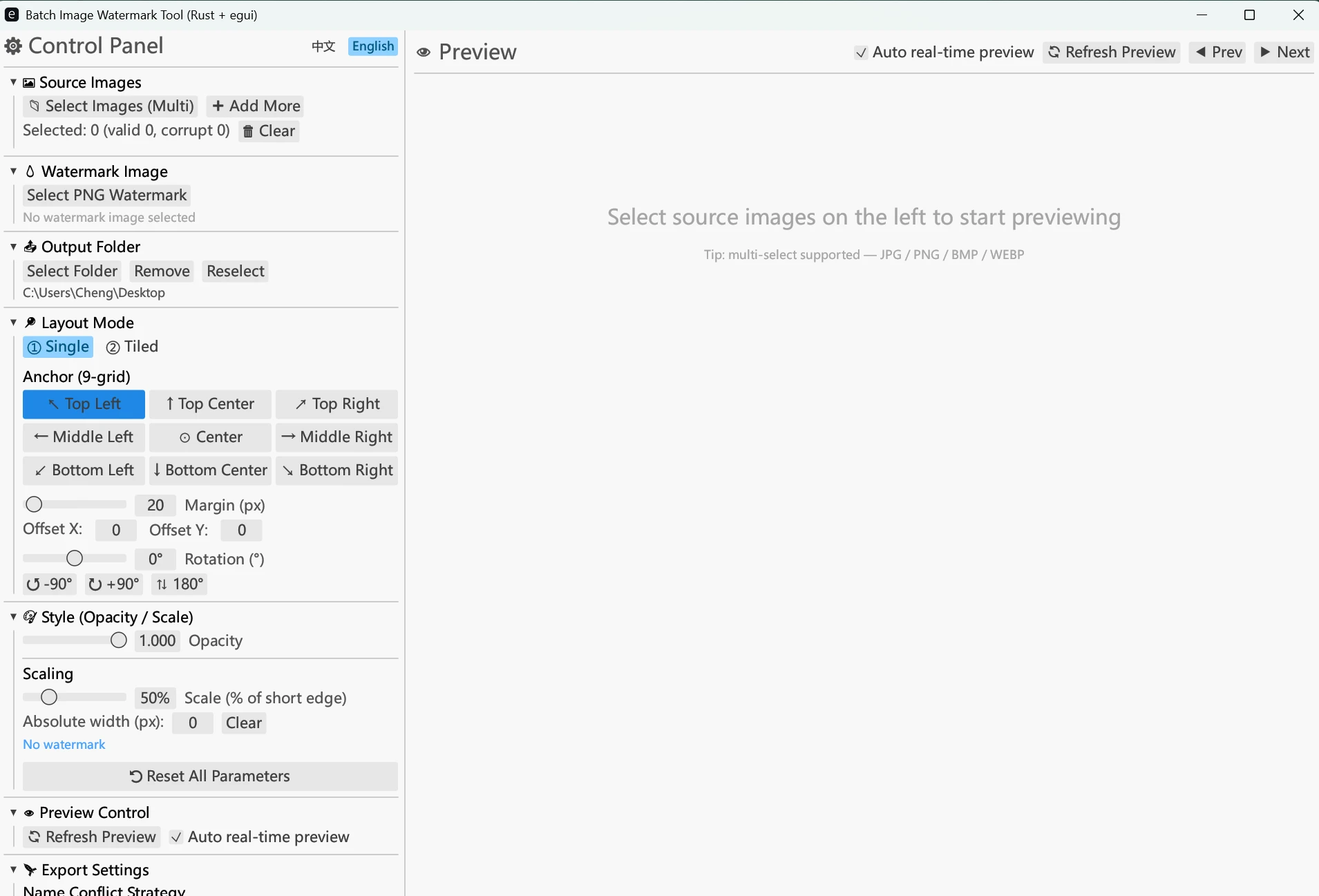
📌 Suggestions: For watermark images, we recommend using images with a transparency channel. PNG format, which produces the best results.
🎮 3. How to Add Watermarks to Multiple Images in Six Steps
- Step 1: Select a watermark design — Upload your brand logo (transparent PNG recommended).
- Step 2: Import the images to be processed — You can select a single image or an entire folder (the system will automatically recursively search subfolders).
- Step 3: Adjust the watermark settings — Use the left-hand panel to adjust the position, tiling strategy, transparency, zoom level, or rotation angle.
- Step 4: View a Live Preview — Preview the final composite directly on the canvas on the right; what you see is what you get.
- Step 5: Set the output options — Select the export format (JPEG/PNG), compression quality, and filename conflict policy.
- Step 6: Start batch export with one click — Click "Export" to view the export speed via the real-time progress bar. Once complete, a detailed report will pop up showing the counts for successes, failures, and skips.
🛠️ 4. Developer Guide: Minimalist Single-File Architecture
If you're also a Rust enthusiast, this project is a great way to learn the language. egui An open-source example of UI development and image processing. The project's source code consists of approximately 1,600 lines, all contained in main.rs The structure is clear within a single file.
Technology Stack Overview
| Category | Core Library | Uses |
|---|---|---|
| GUI Framework | eframe + egui (v0.28) |
Immediate Mode Cross-Platform Desktop UI |
| Image Codecs | image + imageproc |
Responsible for multi-format reading and writing, affine transformations, and Alpha blending |
| Concurrency Acceleration | rayon |
Parallel Batch Processing That Fully Utilizes Multi-Core Performance |
| System Interaction | rfd + directories |
Calling the Native File Dialog and Cross-Platform User Configuration Persistence |
Release Compilation Optimization
The project is in Cargo.toml The medium setting features extreme volume optimization (enabled lto = "fat"、codegen-units = 1、strip = true、panic = "abort"). The final compiled Windows single-file EXE is only 5–8 MB...with no external DLL dependencies—it’s truly portable and installation-free; just download and use it!
📌 5. Details on Supported Image Formats
| Format | Read (Input) | Export (Output) | Notes |
|---|---|---|---|
| PNG | ✅ Supported | ✅ Supported | Supports high-quality transparent channel mixing |
| JPEG | ✅ Supported | ✅ Supported | You can freely adjust the image quality factor from 1 to 100 during export. |
| BMP | ✅ Supported | ❌ Needs to be converted | When exporting, all files must be converted to JPEG or PNG. |
| WebP | ✅ Supported | ❌ Needs to be converted | When exporting, all files must be converted to JPEG or PNG. |
Please visit our GitHub repository and give it a star to show your support! If you have any feature suggestions while using the tool (such as adding text watermarks or font options), feel free to leave a comment below or open an issue on GitHub.