
In my day-to-day website operations, I often encounter situations where I need to convert files such as PNGs and JPGs to the WebP format to speed up page loading times.
Converting them one by one is very tedious, so I developed a simple tool that makes it easy toBatch ConversionVarious common image formats, including PNG, JPG, WebP, and GIF, while preserving the original folder structure.
For those who need to useOnline Tool to Convert PNG to WebPOr it may be necessary to process a large number ofConvert JPG to WebPIt’s a great choice for anyone who needs to process images. It can also serve as a local solution for batch converting image formats online—simply double-click to get started. Since it operates locally, it ensures the privacy and security of your images, while offering the same user experience as cloud-based tools.
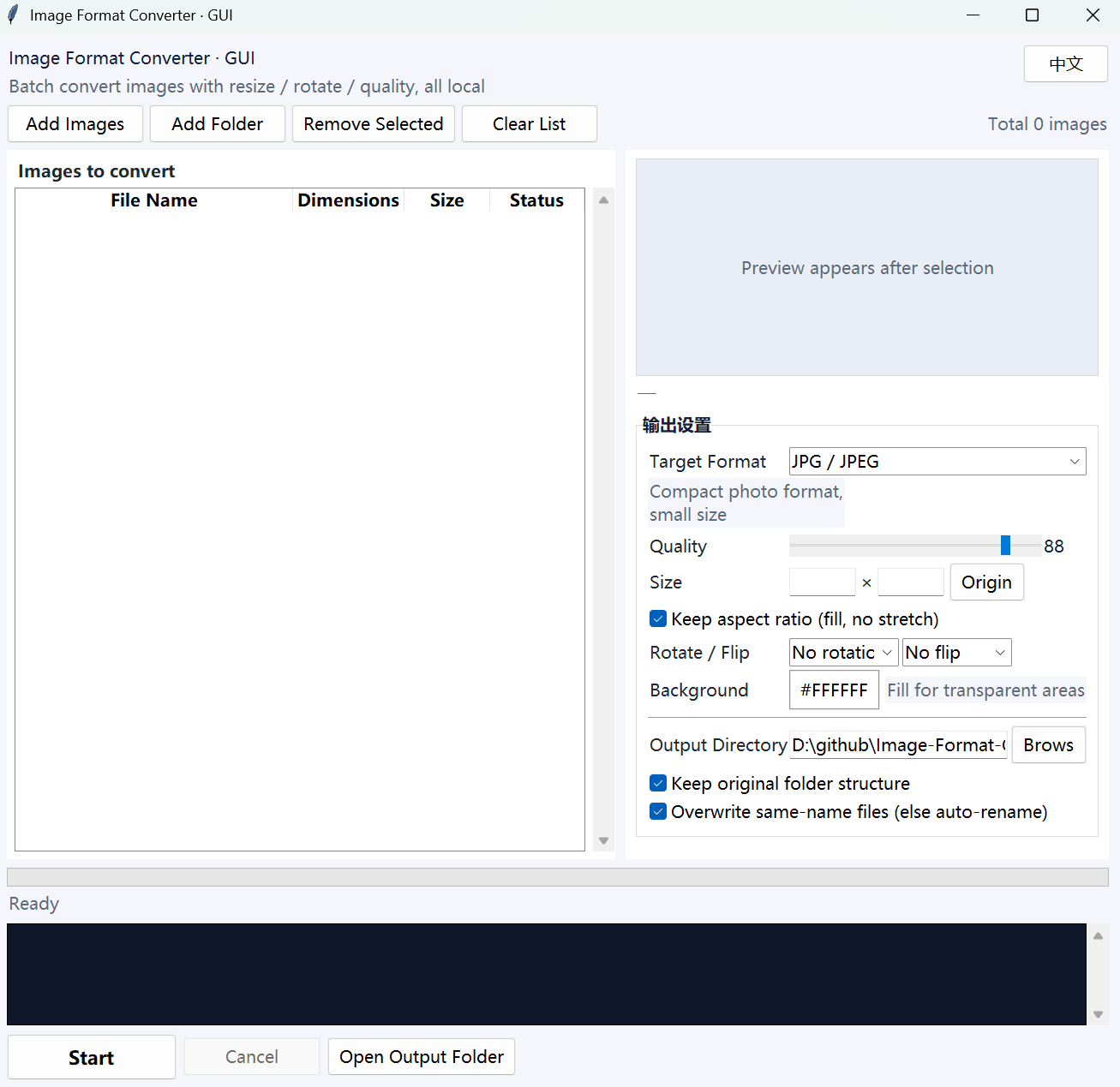
Quark Cloud Storage link: https://pan.quark.cn/s/0a2a59356db1
GitHub project URL: https://github.com/cheng01315/Image-Format-Converter
1. Features and Functions
- Multi-format support: Convert between JPG/JPEG, PNG, WebP, GIF, BMP, TIFF, ICO, and PDF
- Batch Conversion: Import multiple images or an entire folder at once, automatically recursing through subdirectories
- Common Image Processing Techniques: Scale to fit width and height, rotate, flip horizontally/vertically, adjust image quality
- Transparency Processing: When converting to JPG/BMP/PDF, you can specify a background color to fill transparent areas
- Keep GIF: GIF/WebP animations remain animations after conversion (frames and playback speed are preserved)
- Preserve the directory structure: The conversion results are output according to the original directory structure
- Background Execution: The conversion process does not freeze the screen; you can cancel it at any time, and the success or failure of each file is displayed individually.
- Ready to Use Right Out of the Box: On Windows, simply double-click the .exe file to run it; no Python installation is required.
- Switch between Chinese and English:Click the EN/Chinese button to switch between them.
2. Supported Formats
| Format | Description | Best Uses |
|---|---|---|
| JPG/JPEG | General-purpose compressed image, small file size | Top Picks for Photos |
| PNG | Transparent background, lossless and clear | Icons, Screenshots |
| WebP | Google's high-efficiency format, smaller file size | Web-Based Applications |
| GIF | Animated image, minimal colors | Meme images, simple animations |
| BMP | Uncompressed original image; very large file size | High-Quality Printing |
| TIFF | Print High-Resolution Image | Professional Design/Publishing |
| ICO | Windows icons, with multiple sizes embedded | Program Icon |
| Convert Images to PDF Documents | Archive, Share |
3. Instructions for Use
- Use the one in the project's root directory directly
StartGUI.exe - Double-click to run
StartGUI.exe - Click "Add Image" or "Add Folder" to import the images you want to process (you can also launch the program by dragging images directly onto the exe icon).
- On the right, select the target format, video quality, dimensions, rotation/flip, output directory, and other options.
- Click "Start Conversion," and when it's finished, click "Open Output Folder" to view the results.
The default output directory is in the same directory as the exe file. output Folder (created automatically during the first conversion).
4. Project Structure
image-format-converter/
├── StartGUI.exe                                             # Graphical User Interface Edition Executable (Windows, No Installation Required)
├── README.md                                                # Chinese Documentation
├── README.en.md                                             # English Documentation
├── LICENSE                                                  # GNU General Public License v2
├── src/                                                     # Complete Source Code
│ ├── StartGUI.py                                            # Graphical User Interface Version (Tkinter + Pillow)
│ └── build_exe.py                                           # Packaging Script (Generate Icon + Call PyInstaller)
└── output/                                                  # Conversion Results Output Directory (automatically created upon the first conversion)
5. Quick Tip
- 🖼️ Optimizing Website Images: Batch convert PNG/JPG files to WebP; this typically reduces the file size to 30%–50% of the original image size, and can be done directly.Improving Web Page Load Speed, toGoogle SEO Image Format OptimizationVery helpful. Google explicitly recommends using WebP, and batch converting images with this tool will significantly improve your PageSpeed Insights score.
- ⚙️ If you want to convert to the AVIF format (a new-generation, more efficient format), this feature isn't built into the current version, but you can file an issue, and I'll add support for it in a future update.Online AVIF Format Converter(This is still a local conversion, with an experience similar to that of an online tool.)
- 💡 If this is your first time using this feature, we recommend copying a few images to test it first and confirming the results before processing them in batches.