
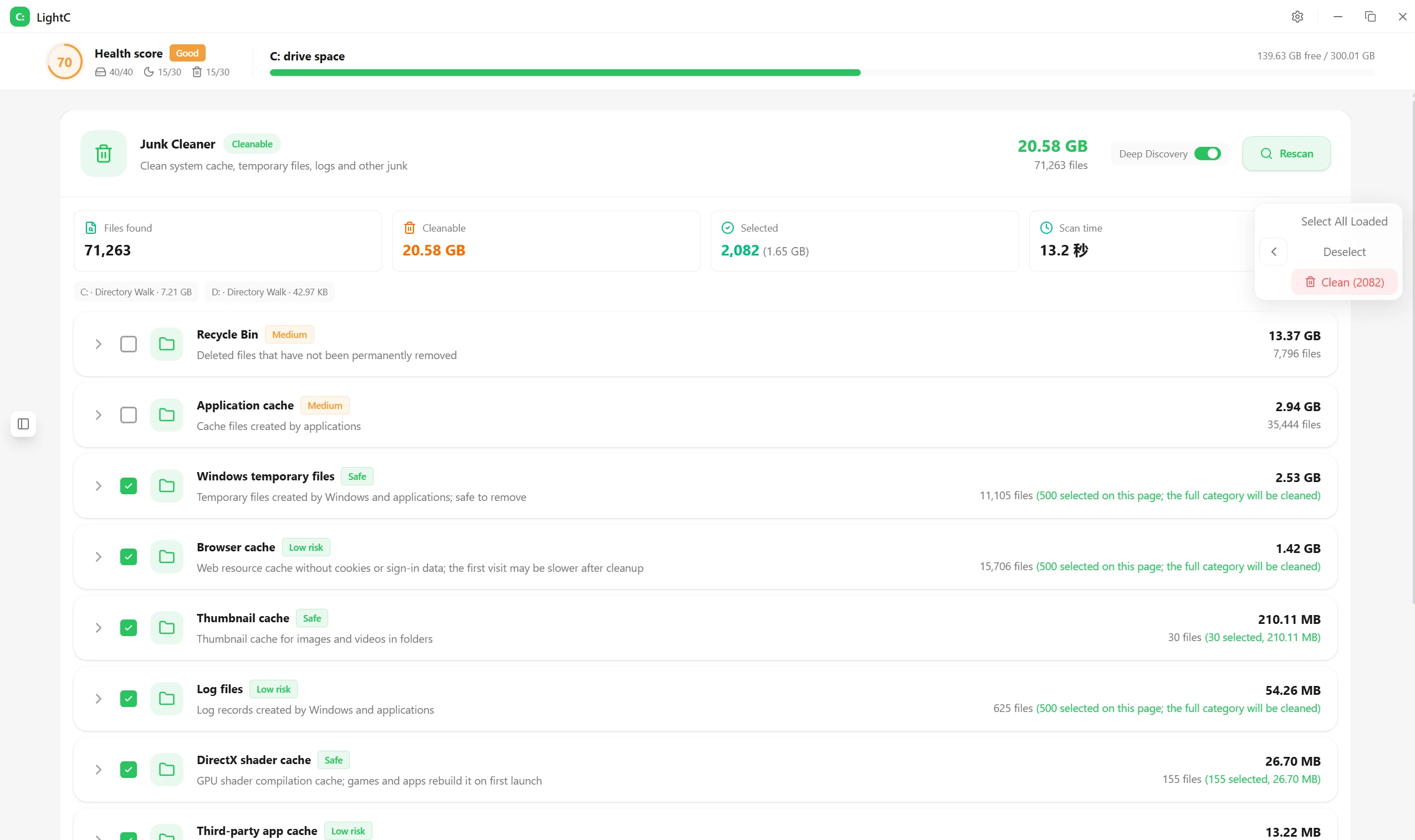
Today, I’d like to recommend a C: drive cleanup tool: LightC. It’s designed to remove junk files, caches, and update patches that have accumulated over time, helping to alleviate low disk space and lag on your C: drive. Designed for everyday computer maintenance and office use, it’s compact, features a focused cleanup process, and is ad-free.
Core Features
- Scan various types of junk files—such as system temporary files, memory dumps, installation packages, and software caches—with a single click.
- Assign a safety clearance level to each type of trash, allowing users to decide for themselves whether to delete it, thereby preventing the accidental deletion of important files.
- Average users can usually free up more than ten GB of space.
- Built-in large file cleanup and disk space analysis, sorted by file size, with an intuitive display of the space occupied by large files and compressed archives
- A dedicated social media cache-cleaning module designed for image and video caches in WeChat and QQ
- Clears only the image and video cache; does not delete chat history, protecting your privacy and data integrity.
- You can disable the Windows hibernation feature to free up disk space equal to the amount of RAM.
- Clean up uninstallation leftovers and repair the registry to keep the system clean
- Automatically backs up before each cleanup; data can be restored if an error occurs
Categories of Junk Files and Security Levels
| Waste Types | Note | Clear Security Levels | User Interaction Characteristics |
|---|---|---|---|
| System Temporary Files | Temporary files generated during system operation | High security; cleanup recommended | One-Click Scan for Automatic Recognition |
| Memory Dump at the Service Station | Memory Snapshots Generated by System Failures | Moderate security | You can manually check the boxes as needed |
| Installation Package | Residual Files from Software Installation | High Security | Check "Clean Up" to free up more space |
| Software Cache | Browser Cache and Software Data Cache | High Security | Supports precise selection for cleanup |
| WeChat and QQ Chat Cache | Image and Video Caching | A dedicated module protects chat history | Only delete photos and videos; do not touch the chat history. |
| Dormant Files | Windows Hibernation Feature Uses Disk Space | Cleaning up frees up a significant amount of space. | One-click shutdown feature to quickly free up space |
User Experience
After clicking "One-Click Scan," the tool will identify all junk files and display the disk space usage by size in a ranked list and a bar chart, making it easy to find the files that take up the most space. After selecting the items you want to clean up and running the scan, you'll typically see a noticeable improvement in available space on Drive C and system responsiveness.
- After the cleanup, the available space on Drive C increased significantly.
- The interface is clean and simple, with no ads or bundled components.
- Tagging by Level Reduces the Risk of Accidental Deletion
- Social Media Cache Cleaner is designed for office workers to reduce the strain that WeChat and QQ caches place on their computers.
- Visualization of hard drive usage to help you decide how to manage disk space
Applicable Scenarios
LightC focuses on cleaning system junk files and caches from office and social media apps, making it ideal for Windows users—especially office workers—who need to keep their computers running smoothly and ensure they have ample storage space. Its automatic backup and categorization prompts alleviate concerns about the process, making it a go-to tool for daily maintenance.
- Compared to some bloated, ad-heavy cleaning apps that are prone to accidental deletions, this one is lighter and more restrained.
- It is suitable for both personal daily maintenance and corporate office environments with disorganized files.
- Solutions for clearing WeChat and QQ caches to improve workplace efficiency
- Clean up Drive C while freeing up space occupied by hibernation files and memory-related data, thereby improving overall performance
Official Website and Project Repository URLs
Official Website:https://lightc.app/en/
Project repository URL:https://github.com/Chunyu33/light-c